

ConniYour AI assistant in CineOrder
With our CineOrder cinema software and its integrated AI assistant Conni, you can ask how to use the software, analyse sales figures and prepare dashboards or vouchers.
Conni is live and available to all our CineOrder customers. The AI assistant is part of CineOrder. You work with your existing permissions and confirm supported changes yourself.

Example questions for Conni: What did we sell yesterday? Which snacks are selling best this week? Build me a dashboard for cinema management. Prepare a €50 gift voucher.
Just ask Conni.
A recreation of the CineOrder interface using sample data from our Lichtblick demo cinema.
How AI assistant Conni helps you run your cinema
Conni is your AI assistant in CineOrder. Pull together sales figures, trace a purchase or build an analysis: just describe what you need. Conni supports you right where you already work.
Check daily figures
Conni summarises the available sales figures. You get a straight answer to your question, without pulling numbers together from several views yourself.
Compare periods
See the trend as a chart or a table. Period and site help you put changes in your figures into context.
Spot popular snacks
A ranking shows you which products are in demand, so you have the figures to hand when planning your counter, combos and offers.
Trace purchases
Ask about the purchase you have open. Conni takes the transaction and your filters into account and helps you check its history and related records.
Prepare your dashboard
Tell Conni which KPIs you want to see. You review the suggested dashboard with your own figures and confirm it before it's saved.
Open the right views
Conni can open matching records and supported views with the right filters applied. From the answer, you go straight on to working in CineOrder.
01 / 03 · Analyse items
Tap the screenshot to view it at its original size.
Working with Conni.
Scroll to explore or click a step.Choose a task to see its screenshot.
Ask Conni which snacks and drinks are most popular in the period you choose. The ranking shows you the items and quantities you need to plan your offers.
“Show me tickets per film and my revenue over time.” Describe the overview you want, review Conni's suggested dashboard and confirm it. You can keep fine-tuning your view afterwards.
Tell Conni what kind of voucher you need. Conni can prepare a voucher product for you to confirm, and you can attach your own image in the chat as context.
What would you like Conni to handle?
Bring the questions from your day-to-day cinema work. In a personal demo, we'll show you how Conni answers them in CineOrder.
Request a Demo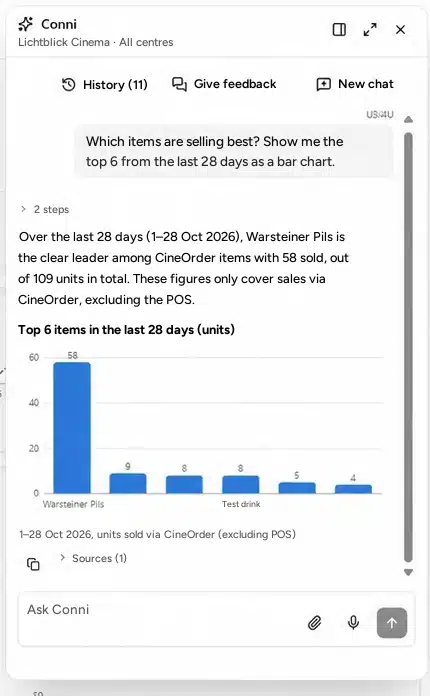
Your cinema in your pocket.
Open CineOrder on your smartphone and ask Conni from the foyer, at home or wherever you are.
- Ask in your own words – typed or spoken
- Get the figures for the cinema you've selected
- Work with your existing access rights
Your permissions. Your call.
Conni respects your access rights and the site you've selected. You review and confirm supported changes yourself.
- Your permissions applyNo answers from areas you don't have access to.
- Your workspaceAnswers only for the selected centre group or centre.
- You decideChanges only happen once you explicitly confirm them.
- TraceableAnswers can be checked against period, site and sources.
Do more with CineOrder.
One search for everything
A customer query about a purchase, a voucher code or a product: global search takes you straight to the right pages and records in CineOrder.
Explore transaction managementShows and pre-orders at a glance
See occupancy, pre-ordered items and quantities up to eight days ahead.
Explore the operational dashboardVouchers your way
Place fields straight onto the template and check the preview – for birthdays, Christmas or corporate events.
Discover gift cards and vouchersReports and live figures
Up-to-date KPIs, your own dashboards and CSV exports – easy to share with your team.
Explore reports & analyticsCheck purchases and payments
Open a transaction and follow the purchase, payment and refund. If questions come up, Conni helps you in the context of that purchase.
Customers & transactionsYour feedback gets heard
Give feedback directly in CineOrder or in your chat with Conni. You'll see the reply and its progress there too.
Go to support