Signage
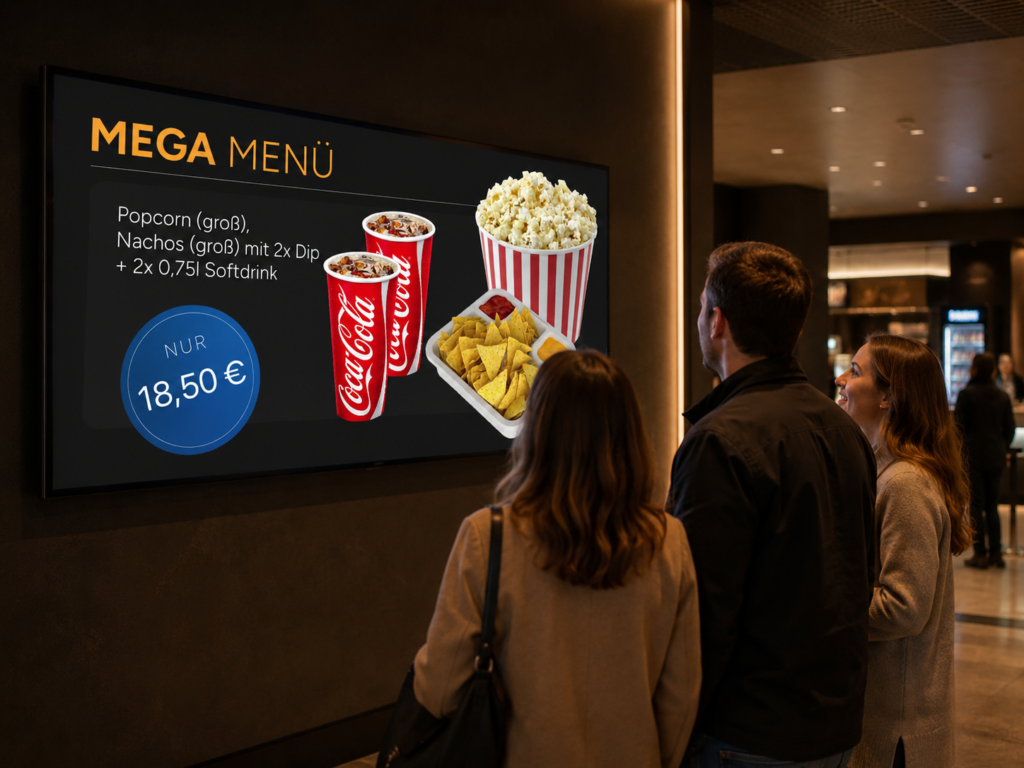
Showtimes run. The display keeps up.
Show your guests current showtimes in the foyer, at the box office or outside the auditorium, alongside your promotions, trailers and concessions offers. Everything straight from your CineOrder system, in a single playlist, across one or multiple sites.
If a screening changes, the display updates automatically – without your team having to update a screen manually alongside paper notices.
A screen right where your guests make their decisions
Signage powers the touchpoints where action happens in your cinema: the first glance upon entering, the wait at the box office, or the way to the auditorium. For a single site or multiple locations combined.
Foyer screen
Box office and auditorium area
Site group
A film changes. The screen updates automatically.
A new film joins the programme, a screening is cancelled, or a showtime changes. Maintaining printed notices and screens separately means updating multiple places at once – making it easy to miss something.
Our signage pulls showtimes directly from your system. Any screening changes are reflected instantly on screen, requiring no extra effort from your team.
Without signage
- Updating showtime changes across multiple places
- Managing posters, screens and system separately
- Changes may appear too late in the foyer
With signage
- Showtimes come directly from your system
- Display updates automatically
- Your team does not need to manually update the display
Showtimes, custom content and multi-site management in one workflow
You define which auditoriums are displayed, what custom content to add, and which sites should run the display. Signage then plays the content in the order you selected.
Always up-to-date showtimes
A signage display automatically shows upcoming screenings for your selected auditoriums. You define how long before and after start time a show counts as “up next”. After that, the screen automatically moves on to the next screening.
- Automatic display of upcoming screenings per auditorium
- Choice of compact or detailed view
- Fully adjustable time window before and after screening start
- No manual updates needed from your team
View
Time window
Showtimes and in-house promos combined
Alongside showtimes, you can embed your own images or videos for promotions, trailers or concessions offers. Upload content directly into CineOrder or integrate a YouTube video. You choose the display duration for each piece of content and set the sequence yourself.
- Upload images or videos directly into CineOrder
- Alternatively: Embed via YouTube video
- Combine showtime displays and custom content in one playlist
- Choose custom display durations for each item
- Videos play automatically until the end before moving to the next item
- Set the content sequence yourself
Display "Autumn Programme"
One cinema. Multiple displays. Or an entire chain.
A signage display can be created for an individual cinema or for a group of sites. If you operate multiple cinemas, you maintain content once and play it out across all assigned locations.
You can set up multiple named displays per cinema, for instance for different areas in the foyer, at the box office or outside the auditorium.
- Create displays for individual cinemas or site groups
- Maintain content centrally or on a location-by-location basis
- Multiple named displays possible per cinema
- Target specific areas throughout the cinema
Would you like to see how showtimes and in-house promos look on your screens?
Let’s talk – every cinema is unique. Together, we’ll find the right solution.

What value does our signage deliver?
Part of your system
One screen, multiple content types
Designed for a single cinema or an entire chain
Continuous development driven by cinemas and innovation
From the demo to your first screen
Initial consultation
Hands-on experience in the test environment
Configuration
Go-live & ongoing support
Questions about Compeso signage
Signage presents information to your guests right where they make decisions: in the foyer, at the box office, in auditorium areas or across a group of sites. Showtimes and custom content run seamlessly in a single workflow.
Yes. If a film or showtime changes, the display updates automatically. This ensures your current showtimes remain accurately displayed on all screens.
Yes. Showtimes and custom promotional content can run on the same screen. This allows you to use a single display for multiple content types instead of maintaining separate screens.
Yes. This page describes signage for an individual cinema, multiple displays and an entire chain. Location groups can be included in the display setup.
The process guides you from the initial demo to your first live screen: initial discovery, hands-on testing in the sandbox system, configuration, through to go-live and ongoing support.